Export your car costs to PDF or Excel
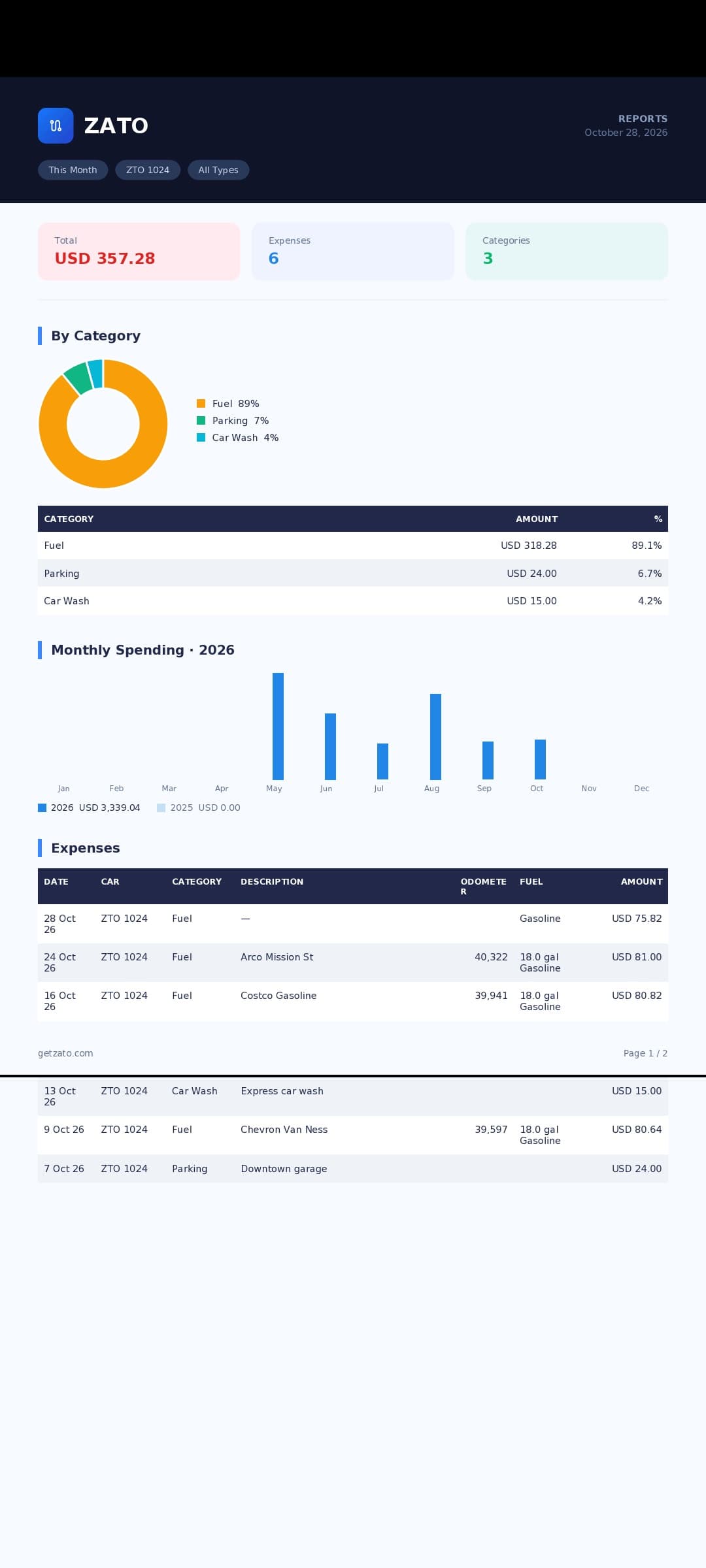
ZATO exports your car expenses as a clean PDF report — total, category breakdown, monthly chart and the full expense list — or as a CSV file that opens correctly in Excel and Google Sheets, from the app or from the web.
- Formats
- PDF · CSV
- Excel
- UTF-8 ready
- Web CSV
- Up to 20,000 rows
- Share
- Any app
A report worth sharing
The PDF includes the total, a category donut and table, monthly spending vs last year and every expense with date, car, odometer and fuel.
Spreadsheet friendly
CSV files open in Excel with accents and special characters intact.
From anywhere
Share from the app, or export the filtered list and print reports from app.getzato.com.
How it works
- 1
Open Reports and pick the period and car.
- 2
Tap Export and choose PDF or CSV.
- 3
Share it to email, Drive or any app — or on the web, use Export CSV or Print / PDF.
For selling your car
A complete, dated history of fuel, service and repairs is one of the best arguments when you sell a car. Export it as a PDF and hand it to the buyer.
For accounting
Using a car for work? A CSV of the period goes straight into your spreadsheet or to your accountant.
Questions about pdf & csv export
Can I export to Excel?
Yes — export a CSV file; it opens in Excel and Google Sheets with correct characters.
What is in the PDF report?
The total, a category breakdown, monthly spending compared with last year and the full expense list.
Can I export from my computer?
Yes — app.getzato.com has Export CSV on Expenses and Print / PDF on Reports.
Works well with
- Car cost reportsMonthly spending vs last year, categories, cost per km, fuel stats and a year-end estimate — clear car cost reports for any period.
- ZATO on the webOpen ZATO on any computer at app.getzato.com: dashboard, expenses with search and CSV export, reports, mileage charts, reminders and the expense map.
- Car expense trackingTrack every car expense in 12 categories — fuel, service, insurance, parking, tolls and more — per car, in 28 currencies. Free for 90 days.
See what your car really costs.
Expenses, reminders, documents and driver chat — on Android and at app.getzato.com. 90 days of Pro free.
