See exactly where your car money goes.
ZATO turns your logged expenses into clean monthly reports — broken down by category, ready to export. No spreadsheets required.
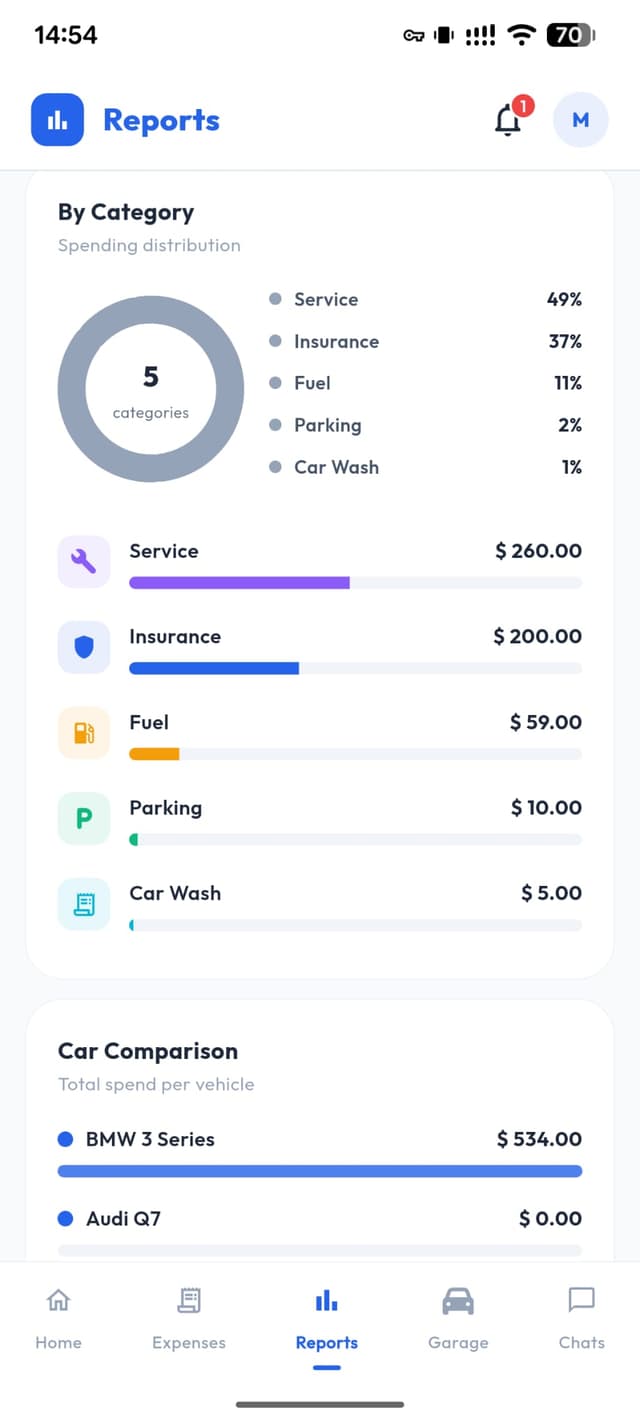
Your monthly breakdown, at a glance
Every expense category tracked automatically — no manual sorting needed.
Monthly Report
May 2026
Total spent
€395
Export to CSV
Excel · Google Sheets · Tax returns
Automatic every month
No setup needed. ZATO groups your expenses by month and category automatically — just log and it handles the rest.
Category breakdown
See at a glance how much you're spending on fuel, repairs, insurance, parking and more — every month, per car.
One-tap CSV export
Export your full expense history to a CSV file instantly. Open in Excel or Google Sheets — perfect for tax returns, insurance claims, or fleet accounting.
How Smart Reports work
Log once, report forever.
- 1Log any expense in ZATO — fuel, repair, service, parking
- 2ZATO automatically groups expenses by month and category
- 3Open the Reports tab to see your monthly spending breakdown
- 4Tap Export to download a full CSV — ready for Excel or Google Sheets
Included in your free trial
Full access to Smart Reports during your 90-day trial — unlimited entries, all categories, CSV export included. After the trial, reports continue with ZATO Pro.
Frequently Asked Questions
Everything about Smart Reports in ZATO.